This article shows how to add a site exception to Java so that you can connect to the Java-based KVM console used by Supermicro IPMI and Dell DRAC systems.
Java complains about the security of the consoles because they use an unverified, self-signed SSL certificate to encrypt communication between the console window and the BMC.
To add an exception manually, follow these steps
Click on the Start button and search for Configure Java.

Click the Security tab and click Edit Site List

Now that you are in the correct location follow the below steps:
Click Add and type HTTP followed by the IP or hostname you are connecting to. Do the same for HTTPS
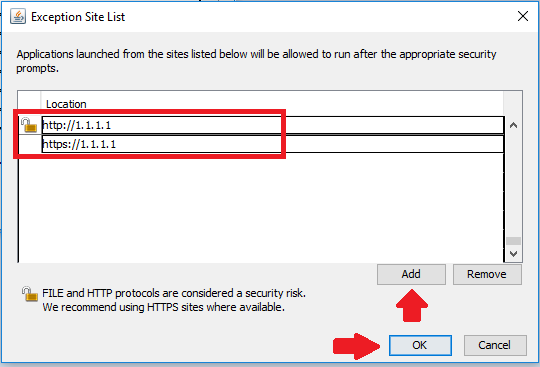
Click Ok, then Ok again to close Java
Now instead of being denied access to the Java console, you should receive a Warning.
Just accept the warning to bypass it and it'll connect.